Dock dla Windows 10 i 11A dock for Windows 10 and 11

Pasek zadań, który pokazuje dzisiejszą sprzedaż.

The taskbar that shows what you sold today.

Wharf zastępuje pasek zadań żywymi widgetami. Za darmo dostajesz 30 widgetów: aplikacje, kalendarz, pogodę, muzykę, zadania, głośność, Wi-Fi i czas przed ekranem. W Pro dochodzi sprzedaż z WooCommerce, Allegro i Stripe, paczki InPost i automatyzacje.

Wharf replaces the taskbar with live widgets. Free gets you 30 widgets: apps, calendar, weather, music, tasks, volume, Wi-Fi and screen time. Pro adds sales from WooCommerce, Allegro and Stripe, InPost parcel tracking and automations.

Bez konta. Bez telemetrii. Instalator ok. 3,6 MB.No account. No telemetry. Installer about 3.6 MB.

W budowieIn developmentFunkcje Pro są w przygotowaniuPro features are in development, premiera, release .

widgetów w Freewidgets in Free
30
procesora w spoczynkuCPU at rest
0,01%
RAM z WebView2RAM with WebView2
~100 MB
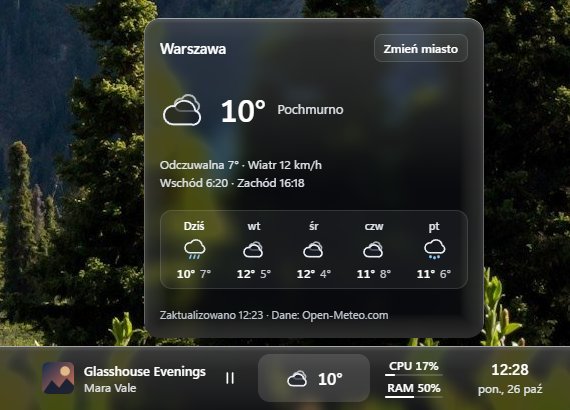
Dock na dole ekranu z otwartym panelem pogody dla Warszawy, odtwarzaną muzyką, obciążeniem procesora i zegarem
Zrzut z działającej aplikacjiScreenshot of the running appStyl Szkło, panel pogody otwarty nad dockiem.Glass style, the weather panel open above the dock.
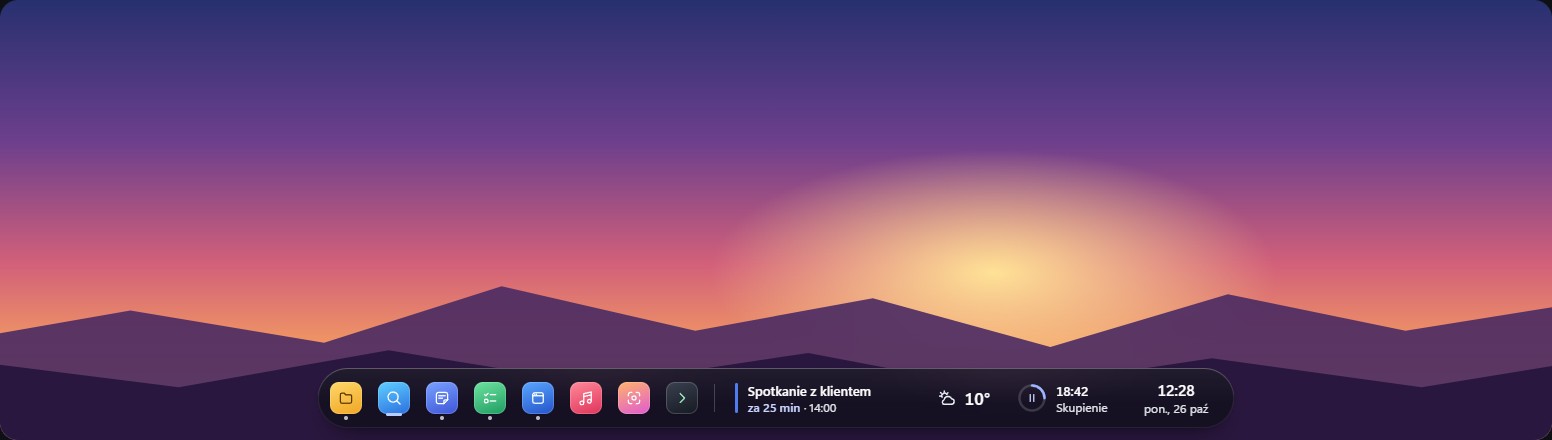
Cały dock w pełnej szerokości ekranu: przypięte aplikacje po lewej, muzyka, pogoda, procesor i zegar po prawej

Zrzut z działającej aplikacjiScreenshot of the running appPełna szerokość, dół ekranu. Aplikacje po lewej, widgety po prawej.Full width, bottom of the screen. Apps on the left, widgets on the right.

DlaczegoWhy

Mniej zakładek, więcej sklepu na pasku.

Fewer tabs, more shop on your taskbar.

01 Prow budowiein development

Sprzedaż bez otwierania trzech paneli.

Sales without opening three dashboards.

Suma z WooCommerce, Allegro, Stripe i kolejnych sklepów w złotówkach, z miesięcznym celem. Patrzysz na pasek zamiast w trzy zakładki.

One total from WooCommerce, Allegro, Stripe and more shops, in PLN, with a monthly goal. You glance at the bar instead of three tabs.

02 Free

Darmowy dock gotowy do pracy.

A free dock that is ready to work.

30 widgetów od razu: systemowe, produktywność, aplikacje, kalendarz, pogoda, zegary świata i reszta. 65 wariantów wyglądu. Dwa style, dół albo góra ekranu, pigułka albo pełna szerokość.

30 widgets out of the box: system, productivity, apps, calendar, weather, world clocks and more. 65 variants to choose from. Two styles, top or bottom of the screen, pill or full width.

03 PrywatnośćPrivacy

Twoje klucze i dane zostają u Ciebie.

Your keys and data stay with you.

Bez konta, bez serwera, bez telemetrii. Klucze API leżą w Windows Credential Manager. W spoczynku dock zużywa 0,01% procesora i ok. 100 MB RAM razem z WebView2.

No account, no server, no telemetry. API keys sit in Windows Credential Manager. At rest the dock uses 0.01% CPU and about 100 MB of RAM, WebView2 included.

FunkcjeFeatures

Co dokładnie zobaczysz na pasku.

What exactly shows up on your bar.

Free działa od razu. Pro jest dla tych, którzy sprzedają przez internet.

Free works right away. Pro is for people who sell online.

  1. Sprzedaż w jednym miejscuSales in one placeProw budowiein development

    Podłączasz WooCommerce, Allegro (logowanie kodem w przeglądarce) albo Stripe. Dochodzą Shopify, Lemon Squeezy, Paddle, Gumroad, Polar i Dodo Payments. Wharf sumuje dzisiejszą sprzedaż i sprzedaż miesiąca w złotych, z podziałem na sklepy, i pokazuje, ile brakuje do Twojego celu. Kwoty w innych walutach przelicza po kursie średnim NBP. Dane odświeża co 5 minut.

    Connect WooCommerce, Allegro (sign in with a code in your browser) or Stripe. Shopify, Lemon Squeezy, Paddle, Gumroad, Polar and Dodo Payments come next. Wharf adds up today's sales and the month's sales in PLN, split by shop, and shows how far you are from your goal. Amounts in other currencies are converted at the NBP average rate. Data refreshes every 5 minutes.

    Liczy wartość brutto zamówień, z wysyłką i podatkiem, bez odejmowania prowizji i częściowych zwrotów. Nieopłacone, anulowane i w całości zwrócone zamówienia pomija. Tylko czyta dane: niczego w zamówieniach nie zmienia, a ich dane trzyma w pamięci, nie na dysku.

    It counts the gross value of orders, with shipping and tax, without deducting fees or partial refunds. Unpaid, cancelled and fully refunded orders are left out. It only reads data: it never changes an order, and it keeps order data in memory, not on disk.

  2. Paczki InPostInPost parcelsProw budowiein development

    Wpisujesz numery przesyłek (do 20), a dock co 15 minut sprawdza ich status, bez wchodzenia na stronę kuriera. Widzisz, która paczka jest w drodze, w doręczeniu albo czeka w paczkomacie, z kodem i adresem. Nie potrzebujesz konta InPost.

    You enter the tracking numbers (up to 20) and the dock checks their status every 15 minutes, without opening the carrier's site. You see which parcel is on its way, out for delivery or waiting in a parcel locker, with the locker code and address. You do not need an InPost account.

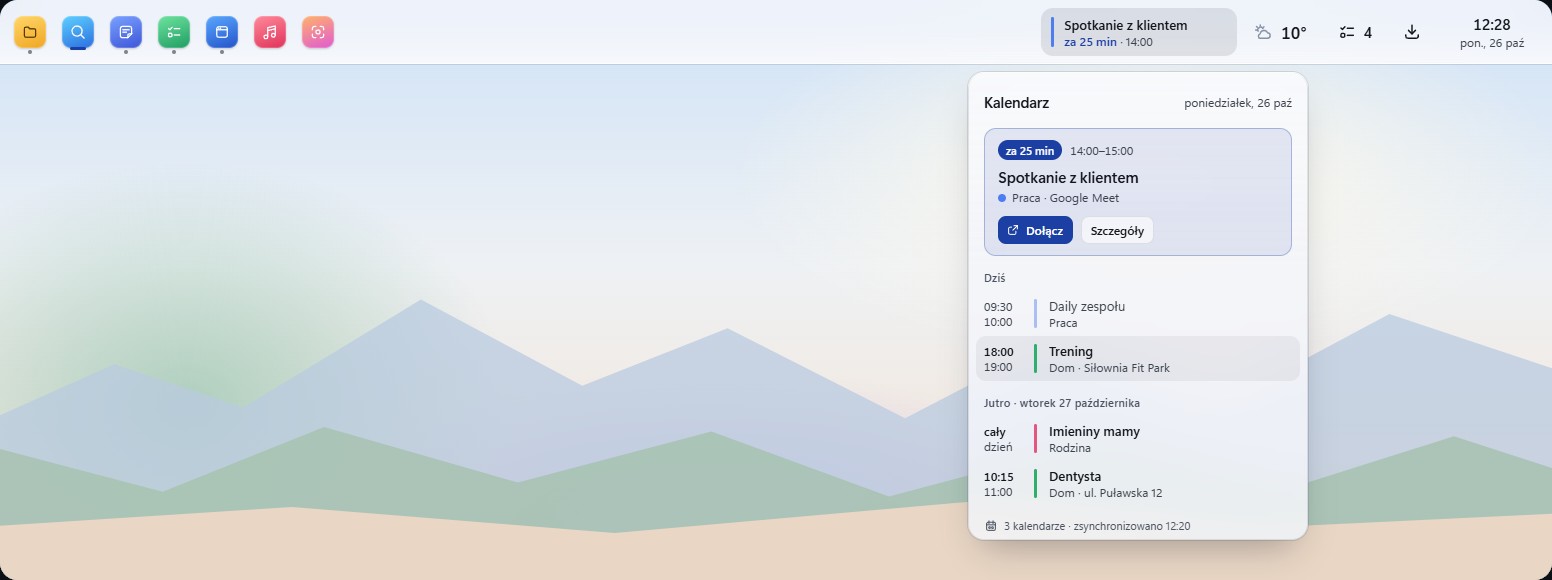
  3. Kalendarz, który mówi, co za chwilęA calendar that tells you what is nextFree

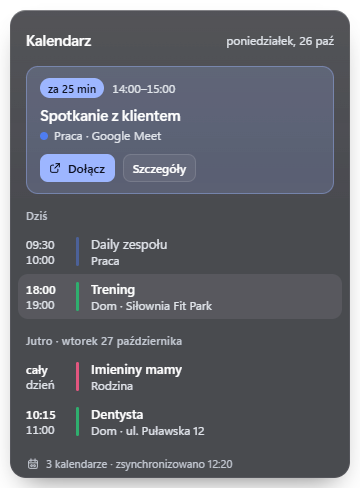
    Dodajesz link iCal z Google, Outlooka, iCloud albo innego kalendarza. Na kafelku widzisz najbliższe spotkanie i ile czasu zostało. Link trafia do Windows Credential Manager, a nie do pliku ustawień.

    Add an iCal link from Google, Outlook, iCloud or any other calendar. The tile shows the next meeting and how long until it starts. The link is stored in Windows Credential Manager, not in a settings file.

  4. Systemowe pod rękąSystem controls at handFree

    Bateria, dyski, sieć, głośność i jasność na jednym pasku. Przełączniki Wi-Fi i Bluetooth działają z docka, a reszta otwiera Ustawienia Windows. Przełącznik motywu i układu klawiatury to jedno kliknięcie.

    Battery, storage, network, volume and brightness on one bar. Wi-Fi and Bluetooth switches work from the dock, and the rest opens Windows Settings. The theme switch and the keyboard layout are one click away.

  5. Produktywność w dockuProductivity on the dockFree

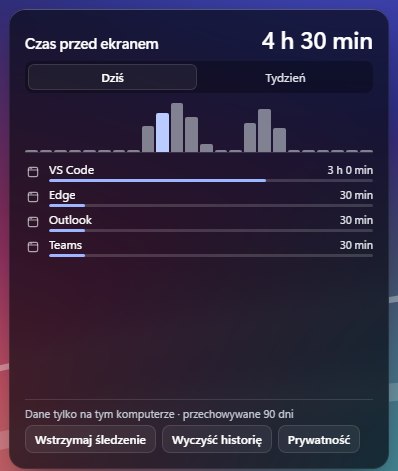
    Czas przed ekranem zostaje na Twoim komputerze i pokazuje, ile czasu spędzasz w aplikacjach. Minutnik, stoper, oś dnia i postęp dnia, miesiąca czy roku. Wyszukiwarka, Komendy do uruchamiania programów i zrzut ekranu. Kursy walut z NBP bez klucza API.

    Screen time stays on your computer and shows how long you spend in each app. A timer, a stopwatch, a day timeline, and progress for the day, the month or the year. Search, Commands to launch programs, and a screenshot tool. NBP currency rates, no API key needed.

  6. Zegary i pogoda w wariantachClocks and weather in variantsFree

    Zegar ma 12 wariantów: cyfrowy, klapkowy, trzy analogowe, siedmiosegmentowy, kartka z datą i zegar z pogodą. Zegary świata pokazują trzy miasta z różnicą czasu w jednym kafelku. Pogoda ma 7 wariantów, od bieżącej po prognozę godzinową i wschód oraz zachód słońca. Ten sam widget dodasz kilka razy z inną konfiguracją: do 8 zegarów.

    The clock has 12 variants: digital, flip, three analog styles, seven-segment, a day page, a date, and a clock with weather. World clocks show three cities with the time difference in one tile. Weather has 7 variants, from current conditions to the hourly forecast and sunrise and sunset. Add the same widget several times with a different setup: up to 8 clocks.

  7. AutomatyzacjeAutomationsProw budowiein development

    • Tryb spotkania: 2 minuty przed spotkaniem z kalendarza dock przypomina o nim, wstrzymuje muzykę i otwiera panel Kalendarza, nie zabierając fokusu aplikacji, w której piszesz.Meeting mode: 2 minutes before a calendar meeting the dock reminds you, pauses your music and opens the Calendar panel without stealing focus from the app you are typing in.
    • Ciemny motyw o zachodzie słońca: Windows przechodzi w tryb ciemny o zachodzie w mieście z widgetu Pogoda i wraca do jasnego o wschodzie. Po wyłączeniu automatyzacji wraca Twój pierwotny motyw.Dark theme at sunset: Windows goes dark at sunset in the city set in the Weather widget and returns to light at sunrise. When you turn the automation off, your original theme comes back.
    • Cisza nocna: w ustawionych godzinach (domyślnie 22:00–7:00) dock nie pokazuje powiadomień. Inne aplikacje bez zmian.Quiet hours: during the hours you set (22:00 to 7:00 by default) the dock shows no notifications. Other apps are not affected.
    • Kamienie milowe: powiadomienie „Cel miesięczny osiągnięty!”, gdy sprzedaż w miesiącu przekroczy Twój cel. Najwyżej raz w miesiącu.Milestones: a “Monthly goal reached!” notification when the month's sales pass your goal. At most once a month.
  8. Pliki pod rękąFiles within reachFree

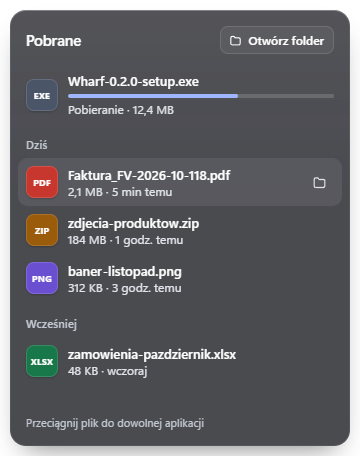
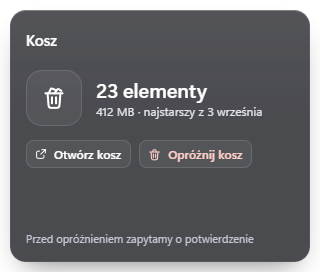
    Pobrane, Zrzuty ekranu, Ostatnie pliki i Kosz. Najnowsze pliki widzisz od razu i otwierasz jednym kliknięciem. Świeżo pobrana faktura jest na górze listy.

    Downloads, Screenshots, Recent files and Recycle Bin. The newest files are on top and open with one click. The invoice you just downloaded is the first item in the list.

  9. Zadania, notatki i timer skupieniaTasks, notes and a focus timerFree

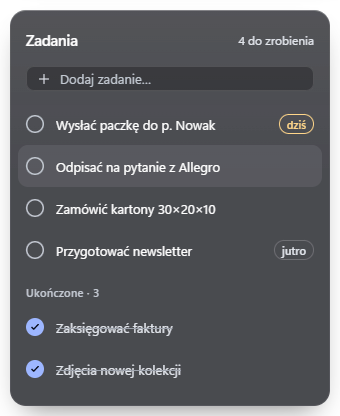
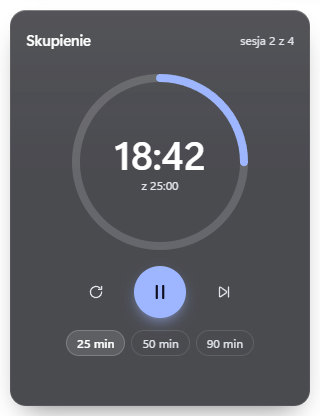
    Lista zadań i notatki zapisują się lokalnie, na Twoim komputerze. Nie synchronizują się z chmurą, bo żadnej chmury nie ma. Timer skupienia: 25 minut pracy i 5 przerwy albo własne czasy, z powiadomieniem Windows.

    The task list and notes are saved locally, on your computer. They do not sync to the cloud, because there is no cloud. The focus timer runs 25 minutes of work and 5 of break, or your own lengths, with a Windows notification.

  10. Wygląd i układLook and layoutFree

    Style: Szkło (przezroczysta szyba na tapecie) i Jasny, a w Pro także Północ. Dock na dole lub u góry ekranu, na całą szerokość albo jako pigułka. Interfejs po polsku i po angielsku. Skrót Ctrl+Alt+D przenosi fokus na dock, żeby obsłużyć go z klawiatury.

    Styles: Glass (a translucent pane over your wallpaper) and Light, and Midnight in Pro. Dock at the bottom or top of the screen, full width or as a pill. Polish and English interface. Ctrl+Alt+D moves focus to the dock so you can use it from the keyboard.

  11. Pasek zadań, który da się odzyskaćA taskbar you can get backFree

    Dock chowa pasek Windows, a Ty wracasz do niego jednym kliknięciem: „Zamknij” w menu docka albo „Przywróć pasek zadań” w ustawieniach. Gdyby program padł, osobny proces pilnujący sam przywraca pasek.

    The dock hides the Windows taskbar, and one click brings it back: “Close” in the dock menu or “Restore taskbar” in settings. If the program ever crashes, a separate watchdog process restores the taskbar on its own.

Galeria widgetówWidget gallery

30 widgetów w Free. Zobacz, jak wyglądają.

30 widgets in Free. See what they look like.

Zrzuty z działającej aplikacji są oznaczone. Pozostałe to wizualizacje z projektu graficznego, więc ostateczny wygląd może się nieznacznie różnić.

Screenshots of the running app are marked as such. The rest are visualisations from the design, so the final look may differ slightly.

Z działającej aplikacjiFrom the running app

ZrzutyScreenshots
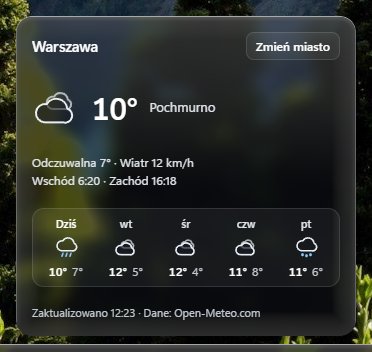
Zrzut panelu pogody w stylu Szkło
PogodaWeatherPanel pogody dla wybranego miasta z prognozą na pięć dni.The weather panel for the city you chose, with a five-day forecast.
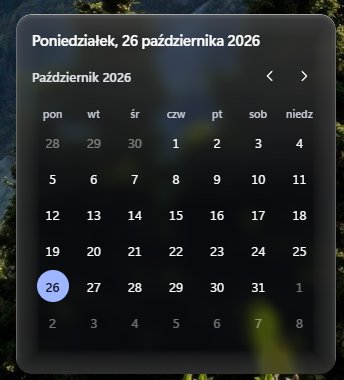
Zrzut panelu zegara z kalendarzem miesiąca
Zegar i dataClock and dateKlik w zegar otwiera panel z dzisiejszą datą i kalendarzem miesiąca.Click the clock to open a panel with today's date and the month calendar.
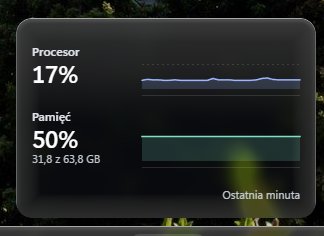
Zrzut panelu z wykresami procesora i pamięci
Procesor i pamięćCPU and RAMObciążenie procesora i zajęta pamięć z ostatniej minuty.CPU load and used memory from the last minute.
Zrzut panelu Czas przed ekranem z listą aplikacji i wykresem dnia
Czas przed ekranemScreen timeIle czasu spędzasz w aplikacjach. Dane zostają na tym komputerze.How long you spend in each app. The data stays on this computer.

Paski docka w działaniuThe dock in action

ZrzutyScreenshots
Pasek docka z baterią, dyskami, głośnością, jasnością, przełącznikami Wi-Fi i Bluetooth oraz układem klawiatury
SystemoweSystemBateria, dyski, głośność, jasność, Wi-Fi i Bluetooth, układ klawiatury.Battery, storage, volume, brightness, Wi-Fi and Bluetooth, keyboard layout.
Pasek docka z zegarami w różnych wariantach: cyfrowym, klapkowym, analogowym, siedmiosegmentowym i z datą
ZegaryClocksCyfrowy, klapkowy, analogowe, siedmiosegmentowy, kartka z datą.Digital, flip, analog, seven-segment, a day page.
Pasek docka z zegarami świata dla Tokio, Nowego Jorku i Warszawy oraz pogodą z prognozą
Pogoda i zegary świataWeather and world clocksOpis pogody, prognoza na kilka dni, trzy miasta z różnicą czasu.Weather status, a few days of forecast, three cities with the time difference.
Pasek docka z wyszukiwarką, minutnikiem, stoperem, czasem przed ekranem, kursami walut i postępem dnia
ProduktywnośćProductivityWyszukiwarka, minutnik, stoper, czas przed ekranem, kursy NBP, postęp.Search, timer, stopwatch, screen time, NBP rates, progress.

Pozostałe widgetyThe other widgets

Wizualizacje projektuDesign visualisations
Wizualizacja widgetu: Kalendarz
KalendarzCalendarNajbliższe spotkania z kilku kalendarzy iCal.Upcoming meetings from several iCal calendars.
Wizualizacja widgetu: Pobrane
PobraneDownloadsŚwieże pliki na górze listy, otwierane jednym kliknięciem.Fresh files at the top, opened with one click.
Wizualizacja widgetu: Zadania
ZadaniaTasksLista zadań zapisana lokalnie, na Twoim komputerze.A task list saved locally, on your computer.
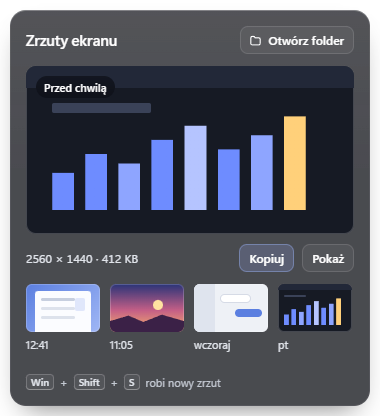
Wizualizacja widgetu: Zrzuty ekranu
Zrzuty ekranuScreenshotsOstatni zrzut i miniatury poprzednich.The latest screenshot and thumbnails of earlier ones.
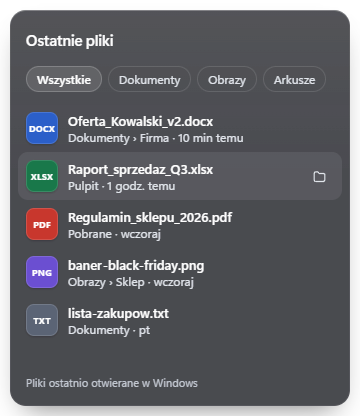
Wizualizacja widgetu: Ostatnie pliki
Ostatnie plikiRecent filesPliki ostatnio otwierane w Windows, z filtrami typów.Files you opened recently in Windows, with type filters.
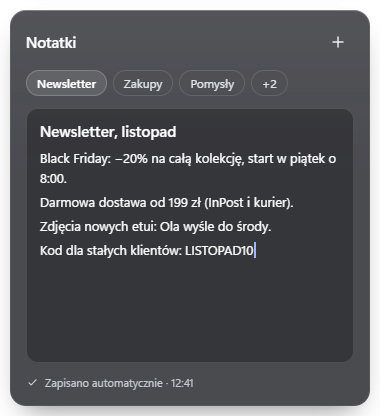
Wizualizacja widgetu: Notatki
NotatkiNotesSzybkie notatki z zakładkami, zapisywane na bieżąco.Quick notes with tabs, saved as you type.
Wizualizacja widgetu: Timer skupienia
Timer skupieniaFocus timer25 minut pracy, 5 przerwy albo własne czasy.25 minutes of work, 5 of break, or your own lengths.
Wizualizacja widgetu: Kosz
KoszRecycle BinLiczba elementów i rozmiar. Opróżnianie z potwierdzeniem Windows.Item count and size. Emptying asks for the Windows confirmation.

Wszystkie widgety FreeAll Free widgets

30 widgetów · 65 wariantów30 widgets · 65 variants

SystemoweSystem9

  • Procesor i pamięćCPU and memory
  • BateriaBattery
  • DyskiStorage
  • SiećNetwork
  • GłośnośćSound
  • JasnośćBrightness
  • Szybkie przełączniki (Wi-Fi, Bluetooth)Quick toggles (Wi-Fi, Bluetooth)
  • Język klawiaturyKeyboard language
  • Przełącznik motywuTheme toggle

ProduktywnośćProductivity13

  • KalendarzCalendar
  • ZadaniaTo-do
  • NotatkiNotes
  • Timer skupieniaFocus timer
  • MinutnikTimer
  • StoperStopwatch
  • Czas przed ekranemScreen time
  • Oś dniaDay timeline
  • Postęp (dzień, miesiąc, rok)Progress (day, month, year)
  • WyszukiwanieSearch
  • Komendy (launcher)Commands (launcher)
  • Zrzut ekranuScreenshot
  • Waluty z NBPCurrency from NBP

Pliki i aplikacjeFiles and apps5

  • Aplikacje (przypięte i otwarte okna)Apps (pinned and open windows)
  • PobraneDownloads
  • Ostatnie plikiRecent files
  • KoszRecycle Bin
  • Zrzuty ekranuScreenshots

Zegar, pogoda, muzykaClock, weather, music3

  • Zegar: 12 wariantów, zegary świataClock: 12 variants, world clocks
  • Pogoda: 7 wariantówWeather: 7 variants
  • Muzyka: Spotify, przeglądarkaMusic: Spotify, browser

Style i układStyles and layout

Wizualizacje projektuDesign visualisations
SzkłoGlassFreeprzydymiona szyba, jasne odbicie u górysmoked glass, a light reflection along the top
Dock w stylu Szkło
JasnyLightFreemleczne szkło, ciemny tekstfrosted glass, dark text
Dock w stylu Jasny
PółnocMidnightProgłęboki granat, szampański akcentdeep navy, a champagne accent
Dock w stylu Północ
Dock w trybie pigułki na dole ekranu
PigułkaPill Dock unosi się nad krawędzią ekranu.The dock floats above the screen edge.
Dock u góry ekranu z otwartym panelem kalendarza
Dock u góryDock on top Panele otwierają się w dół.Panels open downwards.
Free i ProFree and Pro

Zacznij za darmo. Pro dołożysz, gdy sprzedaż zacznie się liczyć.

Start free. Add Pro when sales start to matter.

Pro płacisz raz. Bez subskrypcji i bez konta.

You pay for Pro once. No subscription, no account.

Free
0na zawszeforever

Dock, który po instalacji jest gotowy do pracy.A dock that is ready to work right after the install.

  • Dock zamiast paska zadań Windows 10 i 11A dock instead of the Windows 10 and 11 taskbar
  • 30 widgetów: systemowe, produktywność, pliki i aplikacje, pogoda, zegary, muzyka30 widgets: system, productivity, files and apps, weather, clocks, musicPełna lista w galerii.The full list is in the gallery.
  • 65 wariantów wyglądu, w tym zegary świata65 variants to choose from, including world clocks
  • Kalendarze Google, Outlook, iCloud i inne iCalGoogle, Outlook, iCloud and other iCal calendars
  • Style Szkło i JasnyGlass and Light styles
  • Dół lub góra, pigułka lub pełna szerokośćTop or bottom, pill or full width
  • Polski i angielskiPolish and English
Prow budowiein development
$4.99cena launchowalaunch pricedountil

PotemThen $9.99. Jednorazowo, bez subskrypcji.One-time, no subscription.

Wszystko z Free, a do tegoEverything in Free, plus

  • Sprzedaż z WooCommerce, Allegro, Stripe i kolejnych sklepówSales from WooCommerce, Allegro, Stripe and more shopsSuma w PLN z celem miesięcznym.One total in PLN with a monthly goal.
  • Śledzenie paczek InPostInPost parcel tracking
  • AutomatyzacjeAutomationsTryb spotkania, ciemny motyw o zachodzie, cisza nocna, kamienie milowe.Meeting mode, dark theme at sunset, quiet hours, milestones.
  • Styl Północ i przyszłe styleMidnight style and future styles
  • Kolejne widgety ProMore Pro widgetsShopify, Lemon Squeezy, Paddle, Gumroad, Polar, Dodo Payments są w budowie. Plausible, GitHub, Linear i inne są w planie.Shopify, Lemon Squeezy, Paddle, Gumroad, Polar and Dodo Payments are in development. Plausible, GitHub, Linear and more are planned.

Funkcje Pro są w budowieThe Pro features are in development, premiera, release .

Kup Pro zaBuy Pro for $4.99

14 dni na zwrot. Jeden klucz działa na 3 komputerach. Płatność obsługuje Lemon Squeezy.14 days to get a refund. One key works on 3 computers. Payment is handled by Lemon Squeezy.

PorównanieComparison

Jak wypadamy na tle konkurencji.

How we compare with the competition.

Zestawiliśmy to, co producenci podają na swoich stronach. Stan na 26.10.2026. „Brak informacji” znaczy, że strona tego nie podaje.

We put side by side what the makers state on their own sites, as of 26 Oct 2026. “Not stated” means their site does not say.

Tabela przewija się w bok.The table scrolls sideways.

Wharf Lumabar Seelen UI Winstep Nexus
CenaPrice Free, Pro $4.99, potem $9.99 jednorazowoFree, Pro $4.99, then $9.99 one-time $5.99 jednorazowo (regularnie $15.99 wg ich strony)$5.99 one-time (regular $15.99 per their site) za darmo, open source (AGPL-3.0)free, open source (AGPL-3.0) Free tylko do użytku osobistego. Ultimate od 24,95 €. Licencja firmowa 12,95 € za osobęFree for personal use only. Ultimate from €24.95. Business licence €12.95 per user
Wersja darmowaFree version tak, 30 widgetówyes, 30 widgets nieno tak, cały produktyes, the whole product tak, z ograniczeniami (8 modułów)yes, limited (8 modules)
Zastępuje pasek zadańReplaces the taskbar takyes takyes takyes takyes
Liczba widgetówNumber of widgets 30 w Free, 11 w Pro (w budowie)30 in Free, 11 in Pro (in development) 103 (wg ich strony)103 (per their site) kilka wbudowanych i SDK własnych widgetówa few built in, plus a widget SDK 8, w Ultimate 128, 12 in Ultimate
Sprzedaż: WooCommerce, Allegro, InPostSales: WooCommerce, Allegro, InPost tak (Pro, w budowie), suma w PLN z celem miesięcznymyes (Pro, in development), one total in PLN with a monthly goal brak. Mają Stripe, Shopify, Paddle, Gumroad i innenone. They list Stripe, Shopify, Paddle, Gumroad and others braknone braknone
Interfejs po polskuPolish interface tak (PL i EN)yes (PL and EN) brak informacjinot stated brak informacjinot stated ponad 30 języków (polski niepotwierdzony)30+ languages (Polish not confirmed)
Bez konta i telemetriiNo account, no telemetry takyes tak (wg ich strony)yes (per their site) brak informacjinot stated brak informacjinot stated
SystemySystems Windows 10 i 11 (64-bit)Windows 10 and 11 (64-bit) Windows 10 i 11 (64 i 32-bit)Windows 10 and 11 (64 and 32-bit) Windows 10 i 11Windows 10 and 11 Windows 7 do 11, także ARMWindows 7 to 11, ARM too

Gdzie inni są lepsi. Lumabar ma ponad 100 widgetów i buildy 32-bit. Seelen UI jest otwarty i ma własne SDK widgetów. Nie próbujemy ich dogonić pod tym względem. Wharf celuje w osoby, które sprzedają w polskim internecie: WooCommerce, Allegro, InPost, kwoty w PLN i polski interfejs.

Where the others are better. Lumabar has over 100 widgets and 32-bit builds. Seelen UI is open source and has its own widget SDK. We are not trying to catch up there. Wharf aims at people who sell online in Poland: WooCommerce, Allegro, InPost, amounts in PLN and a Polish interface.

Źródła: lumabar.xyz, seelen.io, winstep.net (strony producentów, 26.10.2026). Ceny i funkcje się zmieniają, więc przed zakupem sprawdź je u źródła.

Sources: lumabar.xyz, seelen.io, winstep.net (the makers' own sites, 26 Oct 2026). Prices and features change, so check them at the source before you buy.

FAQ

Pytania, które padną jako pierwsze.

The questions people ask first.

Czy moje klucze API są bezpieczne?Are my API keys safe?

Klucze do WooCommerce, Allegro i Stripe trafiają do Windows Credential Manager, czyli tam, gdzie Windows trzyma hasła do sieci. Część interfejsu, którą widzisz, nigdy ich nie dostaje: zapytania do API wykonuje osobna część natywna, która dokleja uwierzytelnienie. Wharf tylko odczytuje dane (zapytania GET). W WooCommerce wystarczy klucz z uprawnieniem „Odczyt”. Stripe przyjmuje wyłącznie klucze ograniczone (rk_), więc zwykły klucz sk_ zostanie odrzucony. Do Allegro logujesz się kodem urządzenia w przeglądarce, bez wklejania hasła, a Wharf prosi tylko o odczyt zamówień i loginu: nie może wystawiać ofert ani zmieniać zamówień. Dane zamówień trzyma w pamięci, nie zapisuje ich na dysk.

Your WooCommerce, Allegro and Stripe credentials go into Windows Credential Manager, the same place Windows keeps network passwords. The part of the app you see never receives them: a separate native component makes the API requests and adds the authentication. Wharf only reads data (GET requests). For WooCommerce a key with “Read” permission is enough. Stripe accepts restricted keys only (rk_), so a regular sk_ key is rejected. For Allegro you sign in with a device code in your browser, so you never paste a password, and Wharf asks only to read orders and your login: it cannot list offers or change orders. It keeps order data in memory, not on disk.

Jak wrócić do zwykłego paska zadań?How do I get my normal taskbar back?

Jednym kliknięciem: „Zamknij Wharf” w menu docka albo „Przywróć pasek zadań” w ustawieniach, w zakładce „O programie”. Gdy program padnie, osobny proces pilnujący przywraca pasek sam. Jeśli nawet to zawiedzie, polecenie wharf.exe --restore-taskbar robi to ręcznie. Deinstalacja też przywraca pasek.

One click: “Close Wharf” in the dock menu, or “Restore taskbar” in settings, under “About”. If the program crashes, a separate watchdog process restores the taskbar on its own. If even that fails, wharf.exe --restore-taskbar does it by hand. Uninstalling restores it too.
Czy widgety systemowe zmieniają ustawienia Windows?Do the system widgets change Windows settings?

Tylko wtedy, gdy klikniesz przełącznik albo przesuniesz suwak w docku, np. głośność, jasność, Wi-Fi czy motyw. Jedynym wyjątkiem są automatyzacje w Pro, np. ciemny motyw o zachodzie słońca.

Only when you click a switch or move a slider on the dock, for example volume, brightness, Wi-Fi or the theme. The only exception is the automations in Pro, such as the dark theme at sunset.

Czy działa na Windows 10?Does it work on Windows 10?

Tak, Wharf jest budowany dla Windows 10 i 11 (64-bit). Na Windows 10 okno ustawień ma jednolite tło zamiast efektu Mica, który istnieje tylko w Windows 11.

Yes, Wharf is built for Windows 10 and 11 (64-bit). On Windows 10 the settings window has a solid background instead of the Mica effect, which only exists on Windows 11.

Czy muszę zakładać konto? Co wysyła do sieci?Do I need an account? What does it send over the network?

Konta nie ma. Nie ma też naszego serwera ani telemetrii. Aplikacja łączy się tylko z tym, co sama włączysz: pogoda dla wybranego miasta, kursy walut z NBP, linki Twoich kalendarzy, API sklepów w Pro i, w Pro, sprawdzenie licencji co 24 godziny. Gdyby licencji nie dało się sprawdzić przez 14 dni (brak internetu), Pro wyłącza się do następnego udanego sprawdzenia, a Free działa dalej. Zadania i notatki leżą w bazie na Twoim dysku.

There is no account, no server of ours and no telemetry. The app connects only to what you turn on: weather for the city you chose, NBP currency rates, the links of your calendars, the shop APIs in Pro and, in Pro, a licence check every 24 hours. If the licence cannot be checked for 14 days (no internet), Pro switches off until the next successful check, and Free keeps working. Tasks and notes live in a database on your own disk.

Czy Pro to subskrypcja?Is Pro a subscription?

Nie. Płacisz raz: $4.99 w cenie launchowej, potem $9.99. Bez konta i bez comiesięcznych opłat. Jeden klucz działa na 3 komputerach: aktywujesz go w ustawieniach, a gdy zmieniasz komputer, dezaktywujesz go na starym i aktywujesz na nowym. Wersja Free zostaje darmowa.

No. You pay once: $4.99 at launch, $9.99 afterwards. No account, no monthly fee. One key works on 3 computers: you activate it in settings, and when you change computers you deactivate it on the old one and activate it on the new one. The Free version stays free.

Kiedy ruszą funkcje Pro?When will the Pro features ship?

Sprzedaż, paczki InPost, automatyzacje i pozostałe widgety Pro są w budowie. Planowana data: . Wersja Free działa już teraz.

Sales, InPost tracking, automations and the other Pro widgets are in development. Planned date: . The Free version already works today.

Co ze zwrotem pieniędzy?What about refunds?

Masz 14 dni na zwrot, bez tłumaczenia się. Napisz na adres z maila z zakupem.

You have 14 days to get a refund, no questions asked. Reply to your purchase email.

Ile zasobów zajmuje?How much does it use?

Instalator ma ok. 3,6 MB. W spoczynku, według naszych pomiarów na Windows 11, Wharf zużywa 0,01% procesora i ok. 100 MB RAM razem z WebView2.

The installer is about 3.6 MB. At rest, by our measurements on Windows 11, Wharf uses 0.01% CPU and about 100 MB of RAM, WebView2 included.

Czy dock nie zasłoni okien ani gry w pełnym ekranie?Will the dock cover my windows or a fullscreen game?

Dock rezerwuje sobie miejsce jak pasek zadań, więc zmaksymalizowane okna go nie przykrywają. Gdy aplikacja przechodzi na pełny ekran (film, gra), dock się chowa i wraca po wyjściu. Dock stoi na monitorze głównym. Na pozostałych działa zwykły pasek Windows, który się automatycznie chowa.

The dock reserves its space like the taskbar does, so maximised windows never go under it. When an app goes fullscreen (a video, a game) the dock hides and comes back when you leave. The dock sits on your main monitor. On other monitors the regular Windows taskbar stays, set to auto-hide.

Jak dodać kalendarz z Google, Outlooka albo iCloud?How do I add a Google, Outlook or iCloud calendar?

W ustawieniach, w zakładce „Kalendarze”, wklejasz tajny link iCal swojego kalendarza. Wharf odświeża go co 15 minut i tylko czyta. Link trafia do Windows Credential Manager, a nie do pliku ustawień. Zadziała każdy kalendarz, który daje link HTTPS w formacie iCal.

In settings, under “Calendars”, paste the secret iCal link of your calendar. Wharf refreshes it every 15 minutes and only reads it. The link is stored in Windows Credential Manager, not in a settings file. Any calendar that gives you an HTTPS iCal link works.

Zacznij od wersji Free.

Start with the Free version.

Pobierz, zobacz dock na swoim pulpicie i w razie czego wróć do zwykłego paska jednym kliknięciem. Pro dołożysz, kiedy będziesz go potrzebować.

Download it, see the dock on your own desktop, and get the regular taskbar back with one click if you want to. Add Pro when you need it.